Keepit Sellit Donateit
← Back to home

Home inventory app

A home inventory app for decluttering, moving, downsizing and family estates

Keep it, Sell it, Donate it is a free home inventory app for families. You photograph each item room by room to build a list. Then everyone votes Keep, Sell, Donate or Discard, so you end up with an inventory and a decision for every item. It is built for decluttering, moving, downsizing and clearing a family home: use it to declutter a whole house, one room at a time. It is not an insurance valuation tool.

Building a list of your belongings is the easy part. The hard part is deciding what happens to them, especially when more than one person has a say. This app does both.
What is a home inventory app?

A home inventory app helps you build a list of everything in your home. You photograph each item, give it a name and a room, and the app keeps the list for you. You may also see it called a home inventory application, a house inventory app or a household inventory app. People use one to plan a move, to record belongings, to prepare for downsizing, or to share out a family home.

Home inventory software ranges from simple spreadsheets to full home inventory management software built for businesses. This one is built for families and for decisions.

Most home inventory apps stop at the list. Keep it, Sell it, Donate it goes one step further: it also helps you and your family decide what happens to each item. Everyone votes Keep, Sell, Donate or Discard, and the app shows who is keeping what.

Who it is for

  • Families clearing a parent's house. Siblings see every item and have a say, even from different cities.
  • People downsizing. List everything, decide what moves, and pass the rest to family, buyers or charity.
  • People moving house. Build a moving inventory by room and cut down before you pack.
  • Partners and housemates. Settle who keeps what before anything leaves the house.

What a good home inventory records

  • A clear photo of each item, plus close-ups of marks, labels and damage
  • The item's name and the room it is in
  • Its condition, and any notes about where it came from
  • An estimated value for anything that might be valuable
  • A decision for each item: keep, sell, donate or discard

How it works

Three steps take you from an empty list to a finished inventory with a decision for every item.

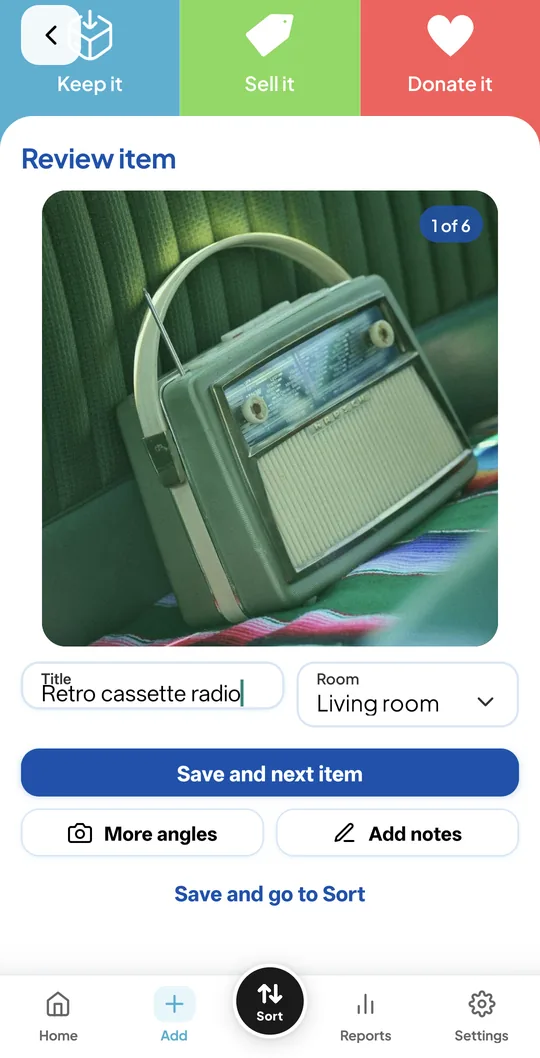
  1. Phone screen reviewing a photo of a retro cassette radio with a title and room field

    Photograph each item

    Take a photo, give it a title and pick the room. Add more angles or notes if it helps.

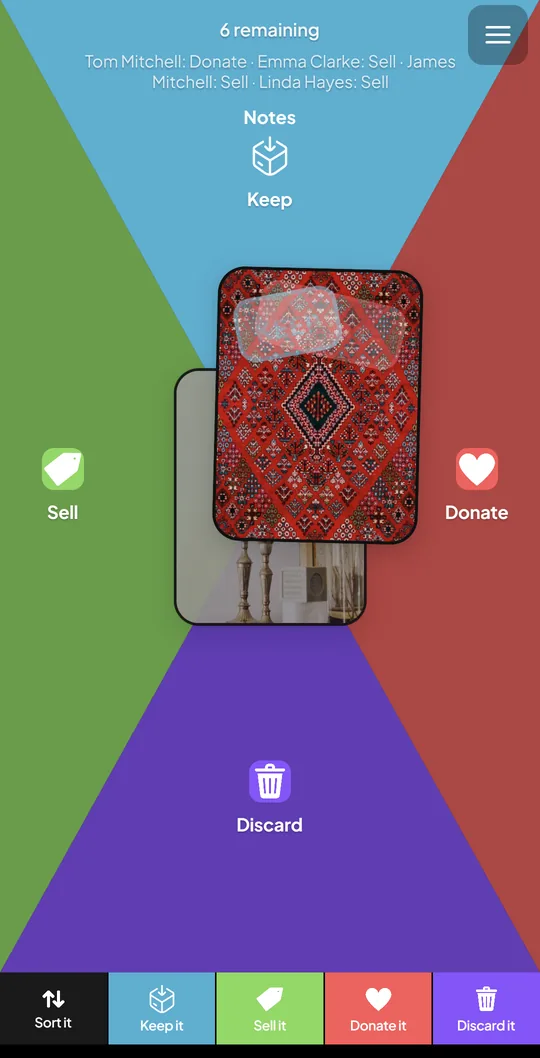
  2. Swipe screen with a photo of a rug and zones for Keep, Sell, Donate and Discard

    Everyone votes

    Swipe each photo toward Keep, Sell, Donate or Discard. Nothing is decided until everyone has voted.

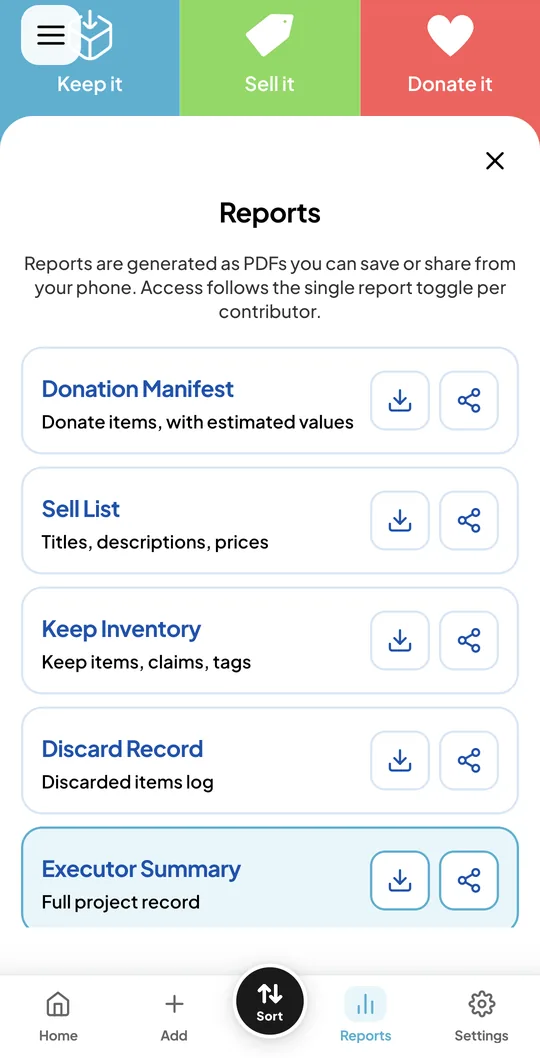
  3. Reports screen listing the Donation Manifest, Sell List, Keep Inventory, Discard Record and Executor Summary

    Save your records

    Save PDF reports: a Keep Inventory, Sell List, Donation Manifest, Discard Record and Executor Summary.

How to choose the best home inventory app for your family

Whichever app you pick, look for these:

  • Easy photo capture. You will be adding hundreds of items, so it needs to be quick.
  • Organised by room, so you can find things and check them off.
  • Sharing. If more than one person has a say, everyone should see the same list.
  • Reports you can save or share, in a format you can keep.
  • Clear privacy controls, including a way to delete your data.
  • Limits and pricing you understand. Check how many items and photos the free plan allows.
  • A fit for your purpose. Some apps are built for insurance records, others for decisions and sharing.

What it is, and what it is not

Keep it, Sell it, Donate it is built for decisions and sharing: moving, downsizing and clearing a family home. It is not an insurance valuation tool. If an insurer needs formal valuations or receipts, check what they require.

The free plan lets you start straight away, with 1 project, 15 items per project, 3 photos per item and 2 people per project. Paid plans (Standard, Large and XL) add more projects, items and people. See the plans on the home page for the limits.

Home inventory app or spreadsheet?

 SpreadsheetKeep it, Sell it, Donate it
CostFreeFree plan, with limits
PhotosStored separatelyBuilt in, with the list
Several people decidingManualEveryone votes on every item
Sale trackingAdd your own columnsListed and sold status, prices
ReportsBuild your ownPDF reports, ready to save
FlexibilityVery flexibleSet structure

A spreadsheet is a fine choice for one person with a short list. An app makes more sense when you have lots of photos or when several people need to agree.

Get started

Start your home inventory free

Download Keep it, Sell it, Donate it for Android (an iPhone version is coming soon), photograph your first room and invite your family to vote.

Get it onGoogle Play Coming soon to theApp Store
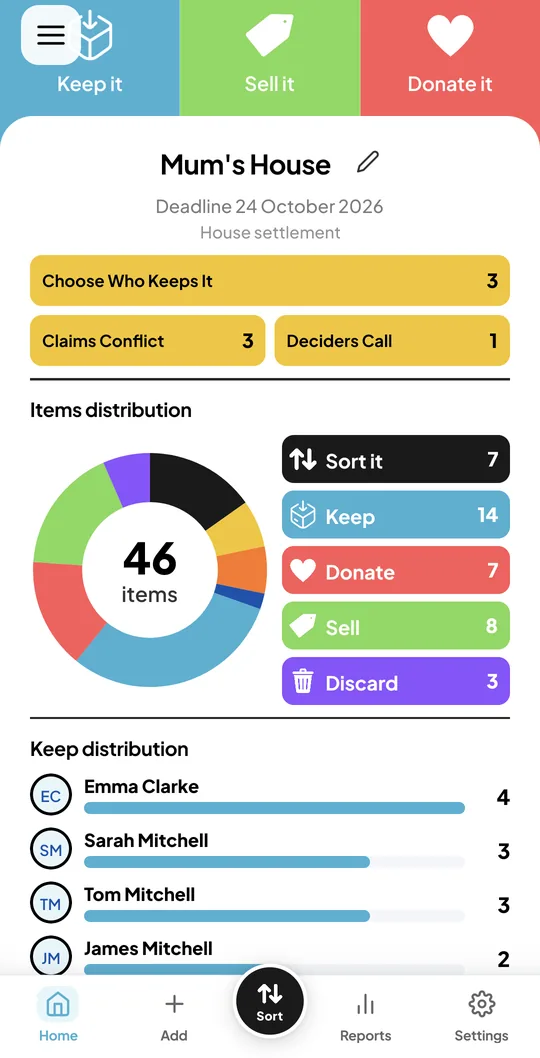
Project dashboard showing 46 items split into Keep, Sell, Donate and Discard, and how many items each person is keeping

Frequently asked questions

What is a home inventory app?

A home inventory app lets you photograph the items in your home and keep them in a list, usually organised by room. People use one to plan a move, record belongings, prepare for downsizing or share out a family home.

What is the best home inventory app?

The best home inventory app depends on what you need. If you want a record for insurance, look for formal valuations and receipts. If you want to decide what to keep, sell or donate, with family input, look for photos by room, shared voting and reports. Keep it, Sell it, Donate it is built for the second kind of need.

Is there a free home inventory app?

Yes. Keep it, Sell it, Donate it has a free plan with 1 project, 15 items per project, 3 photos per item and 2 people per project. Paid plans add more projects, items and people.

What should a home inventory include?

A photo, name, room and condition for each item, plus an estimated value for anything valuable and a decision to keep, sell, donate or discard it. Add serial numbers for valuable electronics.

Can I use a home inventory app for insurance?

A photographed list can support a claim, but Keep it, Sell it, Donate it is not an insurance valuation tool. Ask your insurer what documents and values they need.

Can my family share one home inventory?

Yes. You can invite family members, and each person votes on every item from their own phone. This works well when siblings live in different places.

How is this different from other home inventory apps?

Most home inventory apps record what you own. Keep it, Sell it, Donate it also helps a group decide what to do with each item, flags clashes when two people want the same thing, tracks sales and saves records as PDFs.